Discovery
PaidDiscover
Understand requirements and turn them into structured implementation work: what’s standard, what needs configuration, what’s custom and what’s still unclear. Also called presales and gap analysis.

Odoo Pilot helps Odoo teams understand requirements, plan the work, configure Odoo, build customisations and control how AI-driven changes reach their environment. It works from your project’s Odoo context, and nothing supported goes live without approval.
More capacity. More context. More control.
7-day trial · 300 Pilot Credits · Cancel any time inside the trial
For Odoo partners, agencies, consultants, freelancers, developers, administrators and in-house ERP and IT teams.
A scope estimated at ~16 hours. Completed with Odoo Pilot in ~1 hour.
Measured on an Odoo 19 Enterprise implementation using the same implementation team. Actual time savings vary by scope, environment and complexity.
Bars are drawn to scale. The benchmark answers “does it save time?” The controls further down answer “can I trust it?”
Already used by paying Odoo teams.
Whether you deliver Odoo for customers or run it for your own company, the same three pressures show up.
One business need can be met by a setting, a Studio-style change, a custom module or a different process. Working out which takes discovery, Odoo knowledge and time.
Requirements, decisions, the state of the environment and its history end up in documents, chats, tickets and people’s heads. The next person starts by rediscovering them.
Configuring, customising and building is repetitive work. And every change to a live database is one you’ll need to review, explain and sometimes undo.
Odoo Pilot is designed to remove repetitive work without removing expert judgement.
Odoo delivery starts with the requirement. Begin in Presales and Discovery, move into the delivery mode that fits the work, and keep review and approval around every supported change. Ask Odoo and Pilot Health are supporting information tools you can use whenever you need an answer or a diagnostic view.
Every planScope
Use Presales and Discovery to understand the requirement, identify gaps and open questions, and build the scope and estimate before configuration or customisation starts.
Every planDeliver
Move the scoped work into Implementation Mode, Pilot Studio, Module Builder or Website Builder depending on whether it is configuration, in-database customisation, development or website work.
Every changeControl
Proposed work is explicit, a person approves supported live changes, and every run leaves a record. Eligible changes can be rolled back.
Start with Discovery to understand and scope the requirement, then use the mode that matches the delivery work. Implementation Mode, Pilot Studio, Module Builder and Website Builder are separate workflows today. Ask Odoo and Pilot Health sit alongside the delivery flow as information and diagnostic tools when you need them.
Understand requirements and turn them into structured implementation work: what’s standard, what needs configuration, what’s custom and what’s still unclear. Also called presales and gap analysis.
Configure supported Odoo requirements using project context. Standard Odoo configuration and supported setup, planned against your connected environment and run as reviewable tasks. Kept separate from custom code.
Go beyond standard configuration with supported customisation directly in the connected database: fields, views, supported visibility and access changes, and supported automations.
Build what needs real development: maintainable custom Odoo modules, advanced business logic and deeper integrations, delivered as code your developers can review.
Turn an approved Figma design into an Odoo website module, so less of the design handoff is rebuilt by hand.
Where a custom module can be installed depends on the environment’s Odoo hosting and version. Check the documentation (opens in a new tab) for what your setup supports.
Pilot Health is a supporting diagnostic tool for an existing or changing Odoo environment. Use it when you need a prioritised view of what deserves attention; a new delivery project still starts from Presales and Discovery.
An overall health score, how many items need attention, and the detail across six areas of the environment.
Each area shows something that can affect delivery or day-to-day operation: scheduled actions that fail, email that isn’t configured, customisation that has built up, technical and data issues.
Start with the areas marked Warning and the Technical Alerts. The score helps you decide what to review first. It doesn’t replace judgement.
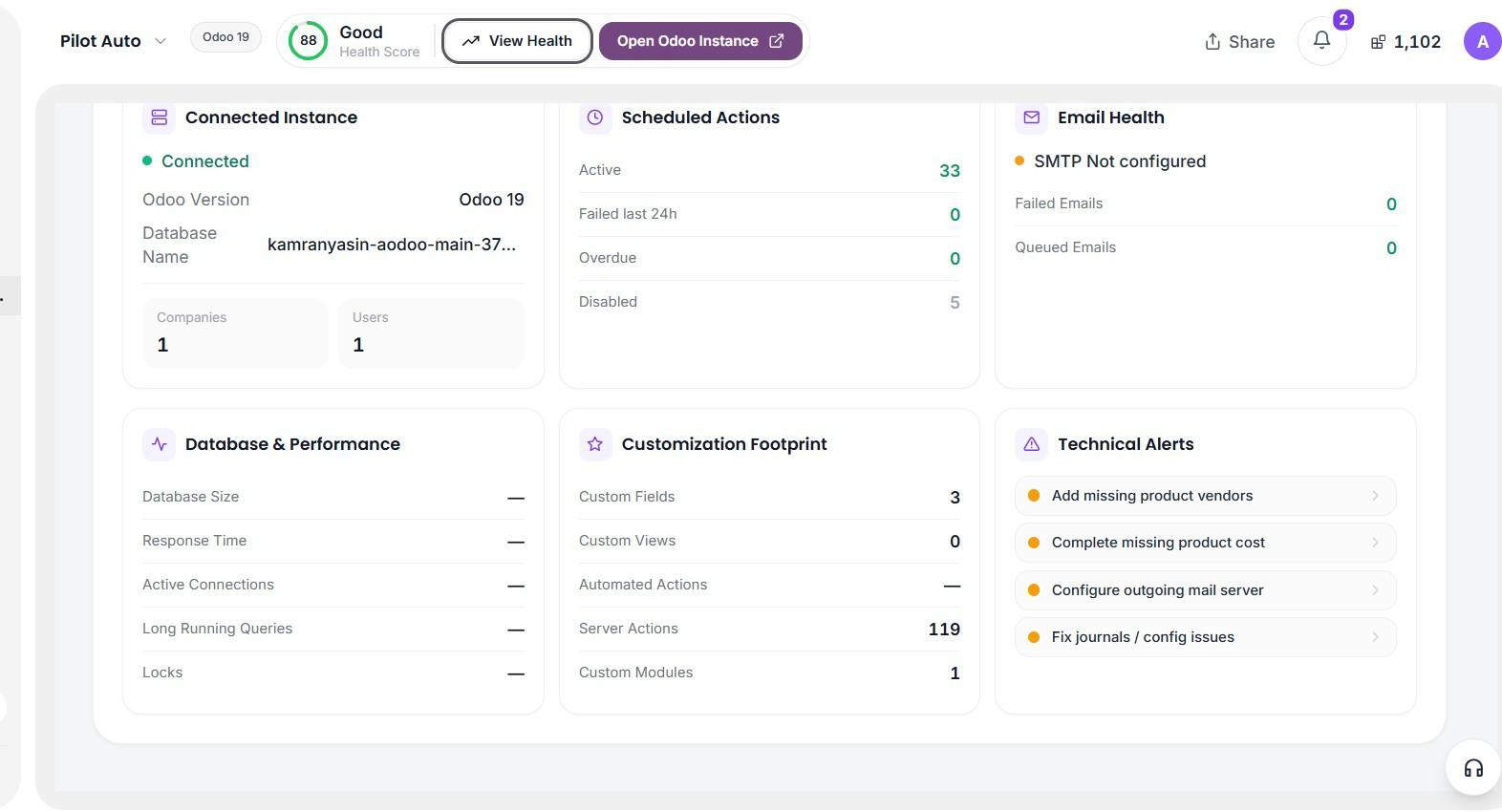
Connected Instance: connected, Odoo 19, 1 company, 1 user. Scheduled Actions: 33 active, 0 failed in the last 24 hours, 0 overdue, 5 disabled. Email Health: SMTP not configured, 0 failed emails, 0 queued emails. Database and Performance: database size, response time, active connections, long-running queries and locks all show a dash, meaning no value. Customisation Footprint: 3 custom fields, 0 custom views, automated actions shown as a dash, 119 server actions, 1 custom module. Technical Alerts: add missing product vendors, complete missing product cost, configure outgoing mail server, and fix journals or configuration issues. The top bar shows a health score of 88, Good, with View Health and Open Odoo Instance buttons.
The score helps you decide what to review first. It isn’t a certification, and it doesn’t cover what Pilot can’t see.
Some values need server or PostgreSQL-level access. When that isn’t available, Pilot shows a dash rather than guessing. A dash means there’s no value, not that the value is healthy.
Re-run the check after configuration or fix-up work, and export a report to share with your team or a customer.
General-purpose AI can answer questions, generate code and increasingly act on systems through tools and connectors. Odoo Pilot adds the Odoo-specific delivery layer around it — so your team doesn’t have to build and maintain that infrastructure itself.
Odoo is a connected business system. A change to a workflow, field, module, automation or customisation can affect more than the person making it expects. Pilot puts structure around AI-assisted delivery, so teams can understand the work, review what’s proposed and control what’s allowed to run — without slowing the work down.
You describe the business outcome. Pilot starts from the requirement, the project and the connected environment.
Pilot turns the request into explicit Odoo work, in the mode that fits it.
You see exactly what will change, before anything is applied.
Nothing runs until an authorised person approves it.
Pilot performs only the approved, supported actions in that mode.
The run stays on record, with a change footprint you can roll back where eligible.
Approval is a human decision inside Pilot. On a client project, review the proposed change with the client first, or with the business owner on an internal one, and approve execution only once you agree.
Execution is bounded by the mode. Each kind of work has its own mode and its own boundary, and Pilot only performs the supported actions available in that mode. If a requirement outgrows its mode, it moves to the next one — so nothing is quietly stretched beyond what the mode is meant to do.
Configure
Standard Odoo configuration and supported setup. Intentionally kept separate from custom code.
“Configure a two-step warehouse flow and import the starting master data.”
Customise
Supported customisation in the connected database: fields, views, visibility and access changes, and automations.
“Add PO Urgency and an internal procurement note, and show both on the Purchase Order view.”
Develop
Maintainable custom modules, advanced logic and deeper integrations, delivered as code your developers can review.
When a requirement outgrows database configuration, it moves here.
Where a change can be safely reversed, Pilot can roll it back. Rollback is limited to eligible actions. It isn’t a universal undo: transactional or externally propagated effects may need a different recovery process.
If the requirement or the configuration was wrong, the task can be corrected and run again in a controlled way.
Solo and Team include hosted AI through Pilot Credits. Custom is built for larger organisations, with custom credit capacity or BYO LLM plus enterprise governance scoped around the way they deliver.
Showing monthly prices.
300 Pilot Credits included. Explore the full toolkit during the trial.
Card required. Cancel any time during the trial before you are charged.
Full Pilot for one practitioner
For an individual consultant, developer, freelancer or administrator using Pilot to do Odoo work.
or $470 a year with annual billing — save 20%That’s $39.20 a month, billed annually · saves $117.60 a year
Start 7-day trial (opens in a new tab)Shared Pilot for your delivery team
For implementation partners, agencies, consulting teams and internal Odoo teams delivering together.
or $2,390 a year with annual billing — save 20%That’s $199.20 a month, billed annually · saves $597.60 a year
Start 7-day trial (opens in a new tab)Your organisation, under its own governance
For organisations running Odoo delivery at scale, or under security, procurement or AI-governance requirements.
Annual agreement · scoped with our team
Talk to us (opens in a new tab)Solo and Team use one Pilot Credit system for hosted AI-assisted work. Different tasks consume different amounts based on the work being performed. Custom is scoped with our team and can use a custom Pilot Credit allowance or a supported BYO LLM setup, depending on the organisation’s requirements.
Consumption varies with the work, so we don’t publish a credits-per-task table. Your usage dashboard shows what your own work consumes from day one of the trial.
Everyone on Team draws from one shared pool, so credits go to whoever is doing the work that month rather than being locked equally to individual seats.
Illustrative exampleMade-up usage of a 30,000-credit month.
Monthly allowances refresh each month and don’t roll over. Credits you buy as a pack are yours for as long as your subscription is active. Bigger packs cost less per credit.
Pilot always spends your monthly allowance first, then purchased credits. Team includes 5 users; each additional user is $49/month and adds 5,000 credits to the shared pool.
Talk to us once you need more than 10 active client projects, larger user volumes, custom Pilot Credit capacity or BYO LLM, stronger security and governance, SSO / SCIM, white-labelled delivery or procurement terms. Active-project capacity is not sold as a Team add-on.
How we price it. Custom is an annual agreement sized from enterprise platform access, user capacity, usage volume and any governance, security or support requirements. Usage can be supplied through custom Pilot Credits or BYO LLM.
Odoo Pilot is an AI implementation platform for Odoo. It helps Odoo teams understand requirements and environments, plan the work, configure Odoo, build customisations and control how AI-assisted changes reach an environment.
Ask Odoo and Pilot Health help you understand a question or an environment. The Pilot toolkit covers discovery, configuration, customisation and development. Controls run across all of it: a person approves supported live changes, and every run is recorded.
Odoo implementation partners, agencies, freelance consultants and developers, and in-house teams who run Odoo for their own company. If your work is delivering or maintaining Odoo, Pilot is built for you.
No. Pilot takes on the repetitive planning, configuration and build work so your experts spend their time on architecture, decisions and exceptions. A person still reviews and approves anything that reaches a live environment.
General AI can answer questions and generate code. Pilot adds the Odoo-specific delivery layer around that: your project and environment context, a defined mode for each kind of work, review and approval before changes run, continuity across projects, and rollback where supported.
Ask Odoo answers Odoo questions. Ask a general question and it draws on Odoo knowledge. Sync a project and it can also work from the context Pilot has for it — requirements, version, modules, customisations and existing project information — where that is available, connected and permitted.
Ask Odoo is included on every plan and uses a small number of Pilot Credits per question.
Pilot Health connects to an Odoo environment and reports on the connected instance, scheduled actions, email configuration, database and performance indicators, the customisation footprint and detectable technical alerts, with an overall score to help you decide what to review first.
Some values need server or PostgreSQL-level access. Where that isn’t available, Pilot shows a dash rather than guessing. A dash means there is no value, not that the value is healthy. Pilot Health is included on every plan and uses a small number of Pilot Credits per run.
Yes. Most of the work Pilot is built for happens on environments that already exist and that nobody fully documented. Pilot Health and Discovery are designed for exactly that situation.
No. Pilot proposes the work and shows you what it intends to change. Supported live changes only run after an authorised person approves them inside Pilot.
Pilot turns the requirement into explicit Odoo work, shows you what will change, and waits. Nothing is applied until someone approves it. On a client project, review the proposed change with the client first; on an internal one, with the business owner.
Where a change can be safely reversed, Pilot can roll it back. Rollback is limited to eligible actions and isn’t a universal undo — transactional or externally propagated effects may need a different recovery process. If the requirement or configuration was wrong, the task can be corrected and run again in a controlled way.
Execution is bounded by the mode. Implementation Mode does standard Odoo configuration and supported setup. Pilot Studio does supported in-database customisation — fields, views, visibility and access, automations. Module Builder produces maintainable custom modules as code your developers can review. If a requirement outgrows its mode, it moves to the next one rather than being quietly stretched.
Pilot works from the project context you give it and the environment you connect, within the access you permit. What Pilot can see depends on what you connect and what you allow. See the documentation for the current detail on data handling, or ask us before you commit a project to it.
No. Every plan starts with a 7-day trial that includes 300 Pilot Credits. A card is required, and you can cancel any time inside the trial without being charged.
We don’t run a free tier because Pilot does real delivery work — every action it takes has a real cost behind it. We’d rather give you a working product for a week than a permanently limited one.
Pilot Credits measure the work Pilot performs — a question answered, a database scanned, a gap analysis, a configuration executed, a module built. Light work uses very few; substantial delivery work uses more.
Solo and Team use Pilot Credits for hosted AI-assisted work. The work itself — scope, complexity, the size of the database and the depth of the change — drives usage. Custom can be scoped with a custom Pilot Credit allowance or a supported BYO LLM setup.
It depends on the work, which is why we don’t publish a credits-per-task table we’d have to keep correcting. Your usage dashboard shows exactly what your own work consumes, from day one of the trial.
For Custom, we size usage around your expected delivery volume and can provide a custom Pilot Credit allowance or support BYO LLM.
Monthly allowances refresh each month and don’t roll over. Credits you buy as a pack are yours for as long as your subscription is active. Pilot always spends your monthly allowance first, so a pack is never used while you still have allowance left.
For Solo and Team, credit-consuming actions pause until you top up or the monthly allowance refreshes. Reading, reviewing and exporting your existing work can continue. Custom has negotiated usage and capacity terms in the annual agreement.
One live client delivery project counts as one active client project. A module, workflow or individual requirement inside that project does not count separately. Solo includes 3 active client projects and Team includes 10 active client projects. If you need more than 10 active client projects, talk to us about Custom.
No. Team includes 5 users, 10 active client projects and 30,000 shared Pilot Credits each month, plus shared projects and context, roles and access controls, organisation usage visibility, shared templates and central billing. Additional users are $49 per user per month and each adds 5,000 credits to the shared pool. If you need more than 10 active client projects, talk to us about Custom.
Yes. You’re charged a pro-rata seat fee for the days remaining, and the new user’s credit grant is pro-rated to match. At your next full cycle, the full seat fee and the full 5,000 credits apply. Removing a user takes effect at the next cycle, and credits already granted aren’t clawed back.
Custom is an annual, quote-based enterprise agreement. Usage can be scoped with custom Pilot Credits or a supported BYO LLM setup. We price Odoo Pilot around enterprise platform access, user capacity, usage volume and any governance, security, SSO / SCIM, audit, SLA or support requirements.
The exact quote depends on your organisation size and expected delivery volume, so larger organisations do not pay the same flat price as smaller ones.
Yes. Custom can support Customer Managed AI / BYO LLM where required. You connect your own provider and that provider bills you directly for model usage.
Odoo Pilot still charges for the enterprise platform, users and platform usage because Pilot continues to provide Odoo connectivity, orchestration, project state, supported execution, logs, QA, governance and support around the model.
Solo and Team are available monthly or annually, with a 20% discount on annual. Custom is an annual agreement. You can cancel a monthly plan at any time and it runs to the end of the current period. All prices are in USD and exclude tax.
Support varies by version, edition and hosting, so please check the documentation (opens in a new tab) or ask us before you commit a project to it.
Hosting also decides where generated code can run, and what Pilot can reach. Odoo Online can’t install custom modules that contain Python code; Odoo.sh and self-hosted installs can. External API access also differs by Odoo plan, so tell us which deployment you’re on and we’ll confirm what will work before you start.
Generated code is meant to be reviewed by your developers and used through your own repository. The Terms of service (opens in a new tab) set out your licence to use generated outputs. If your contracts need explicit ownership wording, talk to us first.
Pilot Health needs a connection to your Odoo instance. The exact requirements are listed in the app and in the documentation (opens in a new tab). You can also use Ask Odoo and Discovery before connecting anything.
Ask a question, connect an environment and run Pilot Health. When you’re ready to change something, Pilot takes it from there, with approval before anything runs.
7-day trial · 300 Pilot Credits · Cancel any time inside the trial
Talk to us about a Custom plan (opens in a new tab)